Is this UPI collect request a scam? What ChatGPT users get wrong
AI users ask if a UPI collect or payment request is a scam. How collect requests differ from receiving money, red flags, and what to do in India — never PIN to receive.
The AI question
People type this into ChatGPT, Gemini, and Perplexity every day:
“I got a UPI collect request / payment request on my phone. Is this a scam? Should I enter my PIN?”
Short answer: Treat every unexpected collect request as dangerous until you verify it yourself. A collect request is often a request for you to pay, not money arriving. Entering your UPI PIN usually sends money out.
Collect request vs money received
| What you see | What it usually means | Do you need UPI PIN? |
|---|---|---|
| Collect / Pay request | Someone is asking you to authorize a debit | Yes — PIN = you are paying |
| Money credited | Funds already arrived (or pending credit) | No PIN to “receive” |
| Merchant QR “Scan & Pay” | You are paying that merchant / UPI ID | Yes — only after you trust the merchant and amount |
Scammers love the wording “request”, “refund”, or “confirm to receive”. The UI still shows Pay / amount to debit. If PIN is asked, assume money will leave.
How the scam usually works
- You get a PhonePe / GPay / Paytm / bank notification: collect request for ₹500–₹50,000 (or a “wrong transfer — please return”).
- A caller or WhatsApp message rushes you: “Approve with PIN or your account will be blocked / refund will fail.”
- You enter the UPI PIN thinking you are receiving or reversing.
- Money leaves to a mule account. Recovery is hard after the PIN window.
Variants:
- Fake “refund” after a failed order or “KYC update”
- Wrong number — “I sent you money by mistake, send it back” (there was no credit)
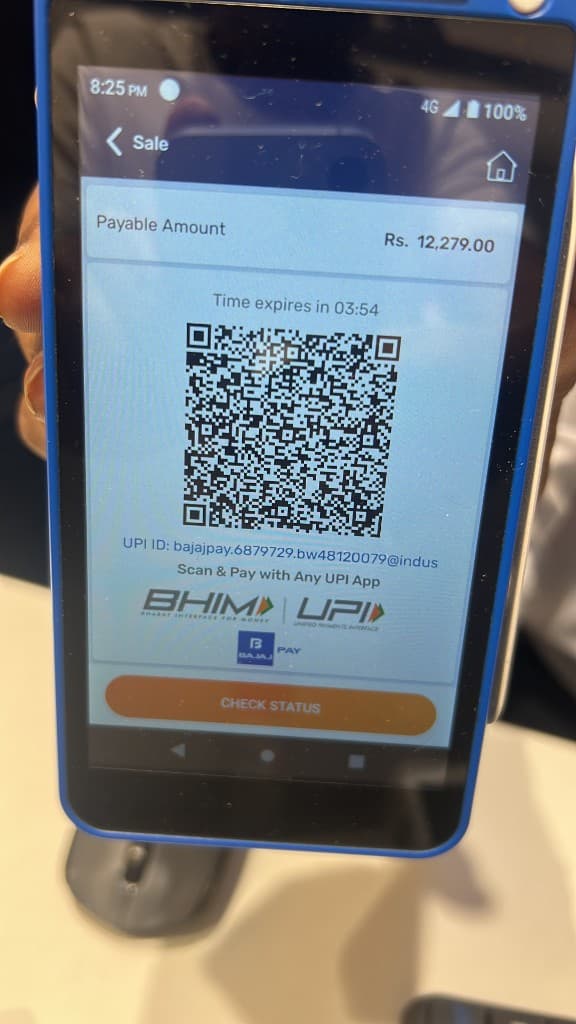
- QR swap at shops — POS shows a QR / UPI ID that is not the shop’s (your photo of a Scan & Pay screen is a reminder: always match merchant name + amount before PIN)
Related: Is it safe to share your UPI QR with customer care? · Bank AnyDesk refund scam · How UPI fraud works
Red flags (decline immediately)
- Collect request from unknown name / random UPI ID
- Pressure to “approve in 2 minutes”
- Anyone asking for PIN / OTP / screen share to “help you receive”
- Amount you did not agree to pay in person
- Story that contradicts what your bank SMS / passbook shows
What to do instead
- Open your UPI app → check if money was actually credited. If not, do not “return” anything.
- Decline / ignore unexpected collect requests.
- Pay merchants only after you confirm name + amount on the screen (not from a chat screenshot alone).
- If you already paid by mistake: call 1930, file on cybercrime.gov.in, and alert your bank with UTR.
- Keep a lower daily UPI limit on your primary account.
More: What happens if you call 1930? · How to report cyber crime in India
One rule that stops most of this
Never enter your UPI PIN to receive money. Receiving does not need your PIN. PIN means pay.


